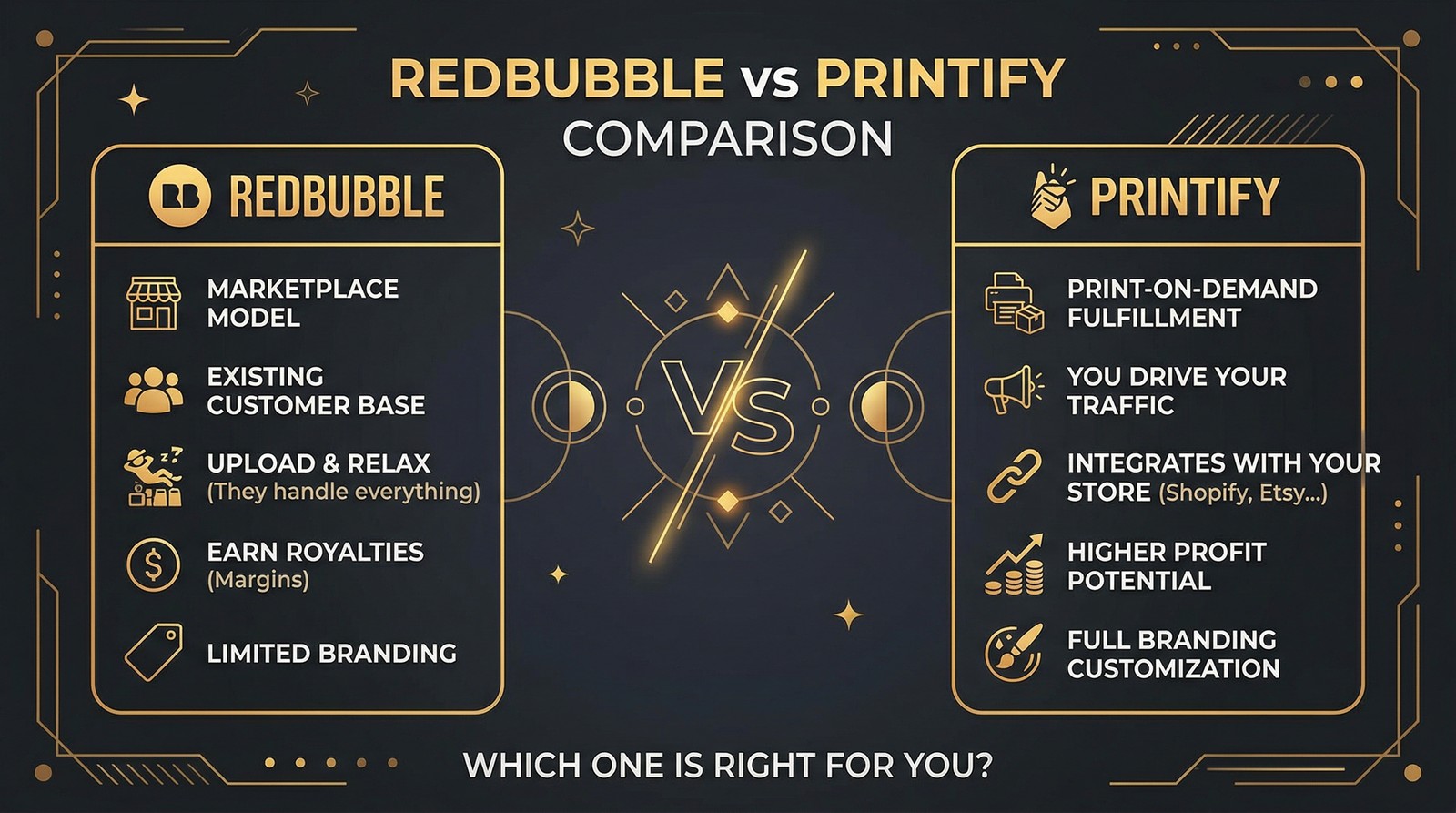
Comparing Redbubble to Printify is like comparing a vending machine to a restaurant. One does all the work for you and takes most of the money. The other gives you control over everything and lets you keep the profits. Neither is objectively "better," but one is almost certainly better for you.
We've tested both platforms extensively, and the decision usually comes down to one question: Do you want passive income with minimal effort, or are you willing to build a real POD business with higher margins?
What Is Redbubble vs Printify?
These platforms solve fundamentally different problems. Redbubble is a destination where buyers shop. Printify is infrastructure that fulfills orders from your own storefront. Understanding this distinction is critical before choosing where to invest your time.
Profit Margins: The Numbers That Matter
This is where the two platforms diverge most dramatically.
Redbubble Margins
Redbubble sets a base price for each product. You earn a royalty percentage on top of that base. The default royalty is typically around 20%, but Redbubble controls the base price.
Example on a standard t-shirt:
- Base price: ~$22
- Default markup (20%): ~$4.40
- Your profit: ~$4.40 per shirt sold
You can increase your markup percentage, but raising prices above market norms on a competitive marketplace usually kills sales velocity.
Printify Margins
With Printify, you choose a print provider with a production cost and set your own retail price. You keep everything above the production + shipping cost.
Example on a standard t-shirt:
- Printify production cost: ~$8-12 (varies by provider)
- Your retail price: $25-30
- Your profit: ~$13-18 per shirt sold
That's 3-4x more profit per sale on the same product category. The catch is you need your own store and your own traffic.
Want to do this yourself? Merch Titans automates the entire process.
Product Selection and Quality
Printify's Catalog Advantage
Printify connects you to over 100 print providers worldwide, offering more than 900 unique products. This includes:
- Apparel (t-shirts, hoodies, tank tops, all-over prints)
- Home goods (mugs, pillows, blankets, shower curtains)
- Accessories (phone cases, tote bags, backpacks)
- Stationery (journals, stickers, greeting cards)
- Specialty items (shoes, embroidered products, premium brands like Bella+Canvas)
The multi-provider model is Printify's secret weapon. Different providers specialize in different products. You can use one provider for t-shirts, another for mugs, and a third for all-over print hoodies, picking the best quality and price for each product.
Redbubble's Curated Selection
Redbubble offers approximately 70+ product types, all produced through their own fulfillment network. The catalog includes popular categories like clothing, stickers, phone cases, home decor, and wall art.
Stickers are Redbubble's breakout product. The platform has become the go-to destination for sticker buyers, and many artists earn the majority of their Redbubble income from sticker sales alone. If stickers are your primary product, Redbubble's built-in sticker buyer audience is genuinely hard to beat.
For more on selling stickers, read our guide to selling stickers online.
Setup and Ease of Use
Redbubble: Upload and Go
Getting started on Redbubble takes less than 30 minutes:
- Create a free account
- Upload your design
- Select which products to enable
- Write a title and tags
- Publish
That's it. Redbubble handles the product page, payment processing, printing, shipping, customer service, and returns. You never touch a product or talk to a customer.
Printify: More Setup, More Control
Printify requires connecting to a selling platform:
- Create a free Printify account
- Connect your Etsy shop, Shopify store, or another platform
- Select a print provider for each product
- Design your product mockups
- Set prices and publish to your connected store
- Handle customer inquiries and manage your store
The setup takes a few hours instead of 30 minutes, but you gain control over pricing, branding, product descriptions, and the customer experience.
Marketing and Traffic
Redbubble's Built-In Marketplace
Redbubble is both the factory and the storefront. The platform attracts millions of monthly visitors searching for unique designs. Your products appear in Redbubble's search results, category pages, and sometimes Google Shopping results.
Your marketing responsibilities on Redbubble are limited to:
- Writing good titles and tags (Redbubble SEO)
- Uploading consistently to stay visible in "new" feeds
- Optionally sharing products on social media
Printify's Blank Slate
Printify doesn't bring you customers. It fills orders. You are 100% responsible for driving traffic to wherever you sell your Printify products.
Traffic sources Printify sellers use:
- Etsy marketplace (Printify integrates directly)
- Shopify store with paid ads and SEO
- Social media marketing (TikTok, Instagram, Pinterest)
- Email marketing to build repeat customers
- Google Ads and Shopping campaigns
This is exactly why we recommend using Merch Titans' keyword research tools to optimize your listings. Finding the right keywords on Etsy and Google is how Printify sellers compete for traffic without massive ad budgets.
Optimize Your POD Listings for Maximum Visibility
Free keyword research tools for Etsy, Amazon, Google, and more. Find what buyers are actually searching for.
Get Started Today →14-day money-back guarantee · Used by 150,000+ sellers since 2018
Scaling Potential
Scaling on Redbubble
Redbubble's scaling model is simple: upload more designs. More designs across more product types equals more surface area for search traffic. Sellers who upload 500-1,000+ designs see compounding passive income as each design becomes a potential traffic entry point.
The ceiling is lower, though. You can't upsell, cross-sell, build an email list, or develop repeat customer relationships. Every sale is essentially a new customer you'll likely never interact with again.
Scaling on Printify
Printify scales with your business capabilities. As your store grows, you can:
- Launch new product lines rapidly
- Build an email list for repeat customers (this alone can 2-3x revenue)
- Run retargeting ads to convert window shoppers
- Expand to multiple sales channels simultaneously
- Use automation tools like Merch Titans to manage multi-platform listings at scale
- Add digital products through platforms like MyDesigns alongside physical POD
The compounding advantage of owning your customer data is the biggest long-term difference. Redbubble owns the customer relationship. With Printify + your own store, you own it.

The Contrarian Take: Use Both, But Build Toward Independence
The Redbubble vs. Printify debate is a false binary. The smartest POD sellers use Redbubble as a passive income floor and Printify-powered stores as their growth engine.
Here's the playbook we see working in 2026:
- Upload every design to Redbubble as a baseline. It takes 5 minutes per design and creates passive royalty streams
- List your best designs on a Printify-connected Etsy shop for higher margins and marketplace traffic
- Build a standalone Shopify or MyDesigns store for maximum margin on your winning designs
- Use Amazon Merch on Demand for Amazon's traffic without Printify fulfillment costs
The end goal is having every design generating income across 3-4 platforms simultaneously. Redbubble provides the easiest passive base. Printify powers the higher-margin storefronts. And platforms like MyDesigns give you the highest margins when selling digital products and templates alongside physical products.
Stop thinking about which platform to choose. Start thinking about which platform to add next. Every additional channel is another revenue stream that compounds your design library's earning potential.
Merch Titans Automation
Manage All Your POD Platforms from One Dashboard
Merch Titans helps sellers upload, optimize, and manage designs across every major print-on-demand marketplace.
14-day money-back guarantee · No contracts · Cancel anytime
Frequently Asked Questions
Which pays more, Redbubble or Printify?
Printify typically pays more per sale because you control your retail price and margins (commonly 30-60% profit). Redbubble pays artist royalties of 10-20% on a base price set by the platform. A $25 t-shirt on Printify might earn $10-15 profit while the same shirt on Redbubble earns $3-5.
Is Redbubble good for beginners?
Redbubble is excellent for beginners because it requires zero upfront investment, no store setup, and no customer service. You upload designs, Redbubble handles everything else. The tradeoff is significantly lower profit margins compared to running your own Printify-powered store.
Can you use Printify with Etsy?
Printify integrates directly with Etsy, Shopify, WooCommerce, eBay, and other platforms. When a customer orders on your Etsy shop, Printify automatically receives the order, prints the product, and ships it directly to the customer.
Do you need a website to use Printify?
You do not need your own website to use Printify. Printify integrates with existing marketplaces like Etsy and eBay where you can list products without building a standalone website. However, connecting a Shopify store gives you full brand control and the highest margins.
Which has more products, Redbubble or Printify?
Printify offers over 900 products from 100+ print providers worldwide. Redbubble offers approximately 70+ product types. Printify's catalog is significantly larger and includes products like custom shoes, embroidery items, and premium brands that Redbubble does not offer.