Most Amazon Merch on Demand sellers are still uploading the same way they did three years ago. One design at a time. Manually writing titles. Copy-pasting bullet points. Googling "is this word trademarked?" in a separate tab and hoping for the best.
We know because we used to do it too. And we built Merch Titans specifically to kill that workflow.
The latest update to Merch Titans Automation changes the game completely. Easy Mode, AI-powered listing generation, and bulk trademark scanning collapse what used to be a full day of work into something you can finish before your coffee gets cold.
What Amazon Merch on Demand Automation Actually Looks Like Now
Forget everything you think you know about upload tools. The old approach was "slightly faster manual work." You still had to fill in fields, check trademarks yourself, and babysit the upload process.
The new Merch Titans Automation workflow is different. The entire pipeline is automated, from design file to live listing.
Here is the actual sequence:
- Drag and drop your design files into the app
- AI generates optimized listing data for every marketplace you are uploading to
- Trademark scanner checks every listing against the USPTO database
- Auto-replacement swaps any flagged terms with safe, relevant alternatives
- Bulk upload pushes everything live to Amazon Merch on Demand and other supported platforms
Five steps. Most of them happening automatically while you do something else.
The numbers: 5 minutes to set up a batch. 100% of listings scanned for trademarks. 100+ designs uploaded in one session.
Easy Mode: The Upload Workflow That Should Have Always Existed
We kept hearing the same thing from sellers. "I love the app, but I wish it were simpler." Fair enough. The previous version had power, but it also had complexity. Too many options when all you wanted to do was get your designs live.
Easy Mode fixes that.
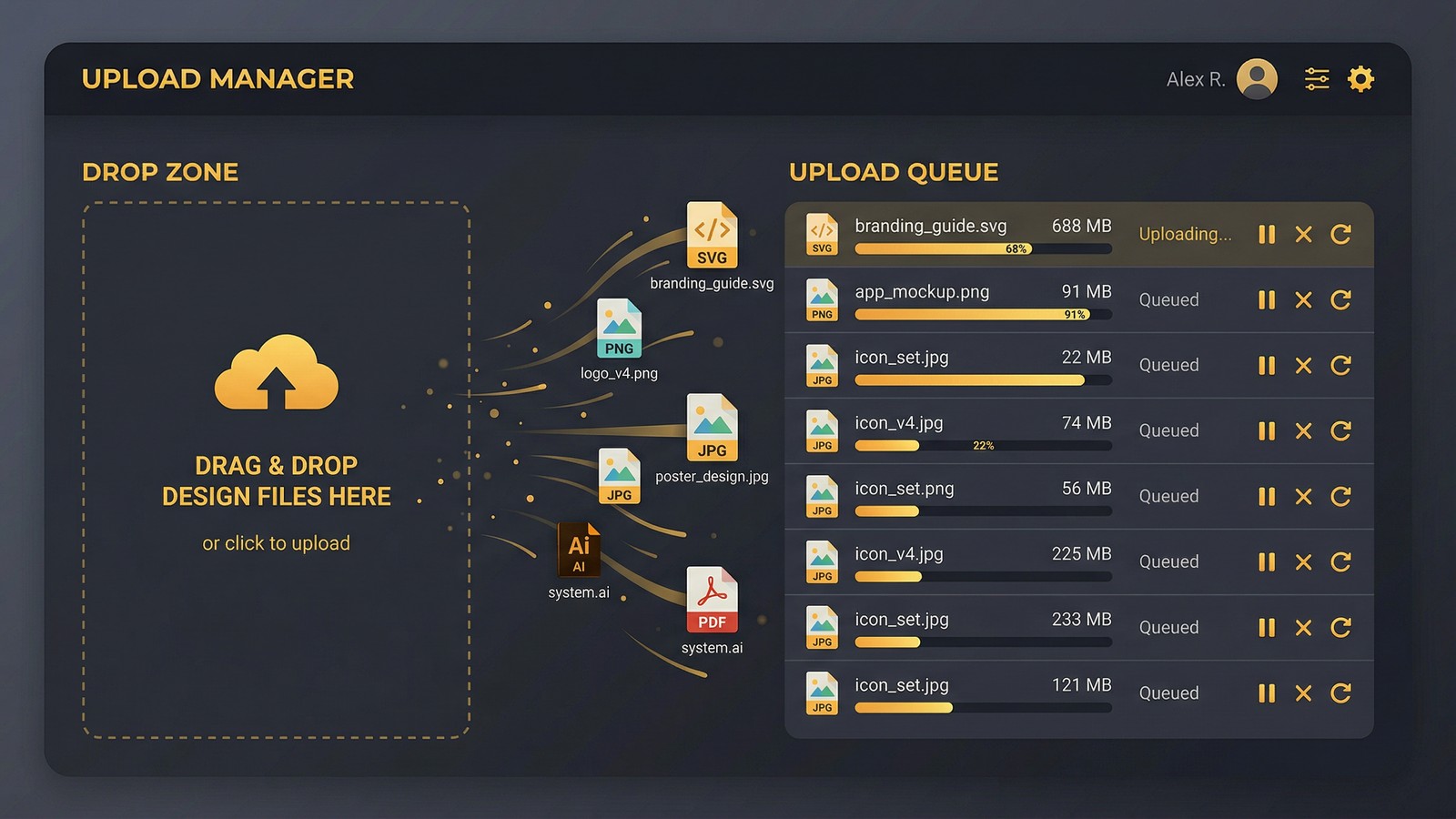
You add your designs. The app does everything else. It picks up your files, runs them through AI listing generation, scans for trademark issues, fixes what it finds, and queues everything for upload to your selected marketplaces.
Who Easy Mode Is Built For
If you are a Tier 100+ seller trying to max out daily uploads, Easy Mode is the difference between spending your evening uploading or spending it designing. If you are a newer seller still learning the ropes, it removes the guesswork entirely.
The friction that used to exist between "I have a design" and "it is live on Amazon" is basically gone.
Important: Easy Mode does not limit you. You can still manually edit any listing before it uploads. The AI-generated content is a starting point you can override, not a locked-in decision.
The Drag-and-Drop Experience
No folder structures to worry about. No CSV files. No naming conventions. You literally drag your PNG files into the app, and it picks them up.
We watched a seller process 87 designs from a weekend design sprint in under 20 minutes. All 87 had AI-generated listings, trademark-clean copy, and were queued for Amazon Merch on Demand upload. That same batch would have taken 12+ hours manually.
AI Listing Generation That Actually Understands Amazon Merch
Here is the problem with generic AI writing tools: they do not understand marketplace SEO. You can paste a design description into ChatGPT and get something that sounds nice but ranks terribly on Amazon.
Merch Titans AI listing generation is purpose-built for what actually works on Amazon Merch on Demand. It generates:
- Titles optimized for Amazon search algorithm, not just readability
- Bullet points that hit the right keyword density without sounding like keyword spam
- Descriptions that convert browsers into buyers
And it does this for every marketplace you are targeting, simultaneously. The listing data for Amazon Merch on Demand looks different from the data you want on other platforms. The AI knows the difference and writes accordingly.
Multi-Platform Listing Data in One Pass
This is the part that saves the most time for sellers working across multiple marketplaces. You are not writing separate listings for each platform. You configure your target marketplaces once, drop in your designs, and the AI generates platform-specific copy for all of them.
One input. Multiple optimized outputs.
Want to see what makes Merch Titans different? Get started today.
Built-In Trademark Scanning That Protects Your Account
Let us talk about the thing that keeps every Amazon Merch seller up at night. Trademark violations.
One flagged listing can get your account suspended. One bad word in a bullet point that happens to be trademarked, and you are dealing with a takedown notice, or worse, a permanent ban. We have seen sellers with thousands of listings lose everything because of a single oversight.
The old way to handle this was painful. You would search the USPTO database manually for every word and phrase in your listings. Or you would use our free trademark checker tool one phrase at a time. It worked, but it did not scale.
How Bulk Trademark Scanning Works
The Merch Titans trademark scanner is built directly into the upload pipeline. Every listing gets scanned automatically before it ever touches a marketplace.
Here is what happens under the hood:
- The scanner parses every word and phrase in your titles, bullets, and descriptions
- It checks each one against the live USPTO trademark database
- Flagged terms get highlighted so you can see exactly what was caught
- The app automatically suggests and applies safe, relevant replacement terms
That last part is the real difference. Other trademark tools tell you "this word is trademarked" and leave you to figure out what to replace it with. Merch Titans handles the replacement for you. The suggested alternatives are contextually relevant, so your listings still make sense and still rank.
Warning: Trademark databases update constantly. Running a check once and assuming you are safe forever is a mistake. The Merch Titans scanner checks against live data every time you upload, so you are always working with current information.
The Math on Trademark Risk
Think about it this way. If you are uploading 50 designs per batch, each with a title, two bullet points, and a description, that is roughly 200 pieces of text that need trademark verification. Manually checking each one takes 2-3 minutes.
That is 6-10 hours of trademark checking alone. For a single batch.
The bulk scanner does the same job in seconds. And it does not get tired, distracted, or skip a word because it "looks fine."
By the numbers: 200+ text fields per batch. Seconds to scan vs 6-10 hours manual. Zero human error - every word checked.

The Full Pipeline: From Design File to Live Listing
Let us walk through what an actual upload session looks like from start to finish. No theory, just the workflow.
Step 1: Drop Your Designs
Open Merch Titans Automation. Drag your design files into the app. PNG, whatever you have got. There is no import wizard, no file configuration. Just drop them in.
Step 2: Select Your Marketplaces
Choose where you want these designs to go. Amazon Merch on Demand is the most popular, but you can target multiple platforms in the same batch. The app handles the differences between each marketplace requirements.
Step 3: AI Generates Your Listings
Hit generate. The AI writes optimized listing data for every design, for every marketplace you selected. Titles, bullet points, descriptions. All of it.
Want to tweak something? You can edit any listing before moving forward. But most sellers find the AI output is good enough to ship as-is.
Step 4: Trademark Scan and Auto-Fix
The scanner runs automatically. Any flagged terms get replaced with safe alternatives. You will see exactly what changed. If you disagree with a replacement, override it. But the default replacements are solid.
Step 5: Upload
One click. The app handles the rest. Your designs go live across your selected marketplaces.
That is the entire workflow. Five steps. What used to take a full day now takes 15-20 minutes, including the time it takes to drag your files in.
A Major UI/UX Overhaul and Why It Matters
We did not just add new features and call it a day. The entire interface got rebuilt from the ground up.
The previous version of Merch Titans Automation was functional, but we will be honest, it was showing its age. Too many menus, too many clicks to do simple things, and a learning curve that was steeper than it needed to be.
The new UI is:
- Cleaner - fewer clicks to get to the actions you use most
- Faster - the app feels snappier, loads quicker, responds instantly
- More intuitive - new sellers can figure out the workflow without watching a tutorial first
We rebuilt the navigation, simplified the settings panels, and redesigned every screen in the upload flow. If you tried Merch Titans before and bounced because it felt overwhelming, it is worth another look.
New Free Tools on the Website
Beyond the app itself, we have added several free tools to the Merch Titans website that any seller can use without a subscription:
- Amazon Keyword Research for finding high-volume, low-competition keywords
- Trademark Checker for quick individual phrase scanning
- Etsy Keyword Research and Etsy Tag Generator for Etsy sellers
- Google Keyword Research for broader SEO planning
These tools are genuinely useful on their own. We built them because keyword research and trademark checking should not require a paid subscription for basic queries.
The Old Playbook Is Dead
Here is the contrarian take that some sellers will not want to hear.
The "grind it out manually" approach to Amazon Merch on Demand is no longer a competitive strategy. It was never a good strategy, honestly. It was just the only option for a long time.
Sellers who are still manually uploading, manually writing listings, and manually checking trademarks are operating at maybe 10% of the speed they could be. That is not a discipline problem. That is a tooling problem.
The sellers scaling to Tier 4000, Tier 8000, and beyond are not doing it through sheer willpower. They are automating the repetitive parts so they can spend their time on the parts that actually require a human brain: design selection, niche research, trend spotting.
If you are spending more time uploading than designing, something is broken. And it is not your work ethic.
Already uploading 100+ designs per session? Easy Mode makes that baseline even faster. Already working on your tier-up strategy? More uploads per day means you hit tier milestones sooner.
Who This Is For and Who It Is Not
We are not going to pretend this is for everyone.
Merch Titans Automation is built for sellers who are serious about scaling. If you upload 5 designs a month as a hobby, you probably do not need this. Manual uploading at that volume is fine.
But if you are:
- Tier 100+ and trying to max out daily upload limits
- Multi-marketplace and tired of writing separate listings for each platform
- Worried about trademark risk and want automated protection
- Spending more time on admin work than on design and strategy
Then this is exactly what you need. The pricing is $29.99/mo on annual billing or $39.99/mo monthly, and at the time it saves, the ROI is pretty hard to argue with.
The future of Amazon Merch on Demand is not about who can upload the longest. It is about who can upload the smartest. And smart uploading is now automated.
Frequently Asked Questions
Can you bulk upload to Amazon Merch on Demand?
Amazon does not offer native bulk upload. Merch Titans Automation handles it by letting you drag and drop hundreds of designs, generate AI-optimized listings for each, scan for trademarks, and upload them all automatically across multiple marketplaces.
How does the Merch Titans trademark checker work?
The built-in trademark scanner checks every word in your listings against the live USPTO trademark database. When it finds a match, it automatically replaces the trademarked term with a relevant, non-trademarked alternative. No manual searching required.
What is Easy Mode in Merch Titans?
Easy Mode is a simplified upload workflow where you drag and drop your designs and the app handles the rest. AI generates optimized titles, descriptions, and bullet points. The trademark scanner cleans your listings. Then automated uploading publishes everything to your chosen marketplaces.
Does Merch Titans support marketplaces other than Amazon?
Yes. Merch Titans Automation supports multiple print-on-demand marketplaces including Amazon Merch on Demand with more platforms available inside the app. You write listing data once and publish across all supported platforms.